Emoji Kitchen vs. Emoji Mixer: Which Fits Your Sticker?
Compare illustrated two-emoji morphs with a browser-based layered sticker studio.
Choose Google Emoji Kitchen when the result you want is a single, illustrated mashup of two supported emoji. Choose Emoji Mixer when you need to arrange two or three separate graphics, add a caption, use flags, or prepare a particular export size. The first approach changes the artwork itself; the second composes recognizable layers. For an exact side-by-side test, try the same pair in both and pick the visual result you prefer.
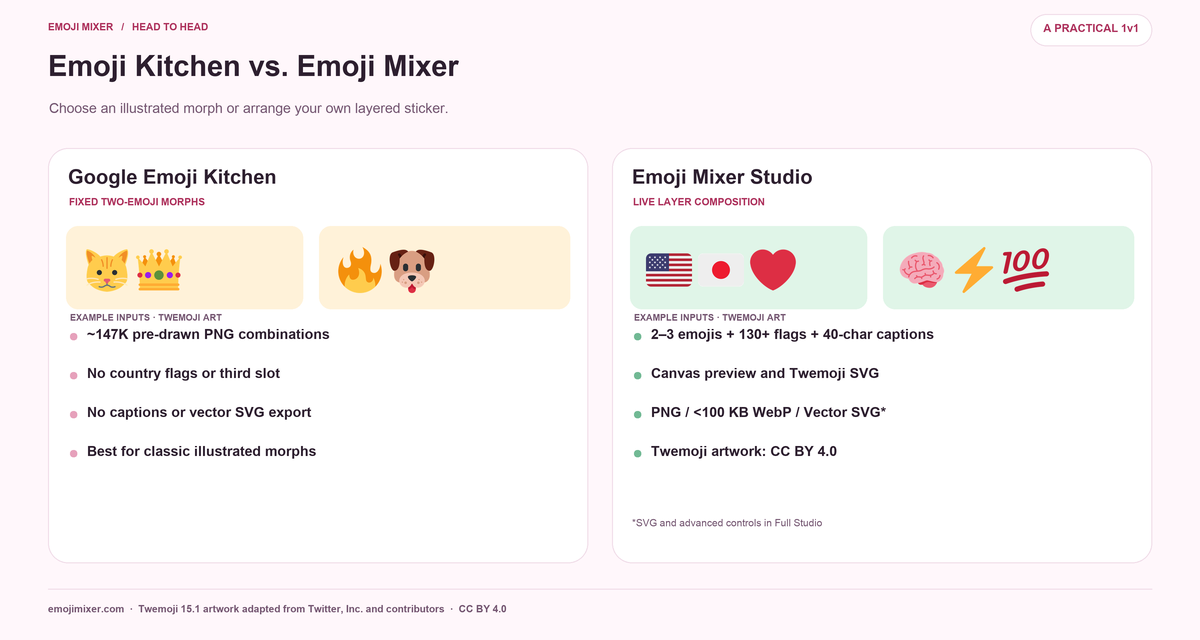
Feature-by-feature: illustration or composition?
| Feature | Google Emoji Kitchen | Emoji Mixer Studio |
|---|---|---|
| Core rendering model | Looks up a pre-drawn two-emoji hybrid where that pair is supported. | Places two or three artwork layers on a live canvas; it does not redraw a hybrid face. |
| Total combinations | Roughly 147,000 pre-drawn PNG pairs; availability depends on whether the pair was illustrated. | 3,600+ Unicode characters and millions of possible pairings; artwork support varies by font and loaded assets. |
| Three-emoji support | The conventional lookup combines two inputs. | A third optional slot can add context, such as 🧠 + ⚡ + 💯. |
| Country and UK subdivision flags | Country-flag combinations are not part of the standard illustrated lookup. | 130+ flags are supported; Universal Twemoji shows supported flags in full color on Windows 10/11, where native flag rendering may differ. Check each subdivision's artwork. |
| Export formats | Typically delivered as a raster sticker or PNG. | PNG and automatic <100KB WebP; the full studio also offers vector SVG when compatible artwork is available. |
| Platform presets | A returned sticker is not necessarily sized for every service. | Use 128/320px Discord, 128px Slack, or 512px WhatsApp WebP with an under-100-KB target. Check the actual size and destination rules. |
| Device and OS requirements | Gboard provides a common Android entry point; availability and keyboard integrations vary. Apple's iOS 18 Genmoji is a separate feature, not Emoji Kitchen. | Runs in a compatible browser across devices; available fonts and artwork loading affect the result. |
| Layer controls | The illustrated result has no independent layers to reposition. | The full studio offers slot lock, scale, flip, and captions up to 40 characters. The quick panel offers layouts and captions but not individual transforms. |
| Privacy and offline execution | Check the keyboard or service's own processing and privacy terms. | Composition happens in the browser with zero creative uploads. Initial loading and uncached Twemoji graphics can require a connection; Native OS rendering uses local fonts. |
| Commercial licensing | No standalone open license is published for Gboard mashup PNGs; verify rights before commercial reuse. | Twemoji graphics are CC BY 4.0 with attribution; native font artwork and other assets have their own terms. See Licenses. |
Exact lookup counts change as Gboard updates, and theoretical pair counts do not guarantee artwork support for every character; test your target symbols before building a pack.
Six real tasks and the better starting point
| Your task | Recommendation | Why |
|---|---|---|
| Create a classic yellow smiley morph | Emoji Kitchen | A supported illustrated blend can merge eyes and mouths into a single expression. |
| Assemble a Discord emote pack | Emoji Mixer | Make consistent transparent 128px images and inspect their dark-mode contrast. |
| Prepare WhatsApp stickers below 100 KB | Emoji Mixer | Start at 512px WebP, then check the displayed size; an oversized result needs simplification. |
| Show two heritage flags on Windows | Emoji Mixer | Try Universal Twemoji in the Flag Emoji Mixer and verify both flag assets load. |
| Add a caption to three symbols | Emoji Mixer | Open 3-Emoji Mixer, select three slots, and add a short line. |
| Make a commercial creator graphic | Emoji Mixer with Twemoji | Use available CC BY 4.0 artwork, supply attribution, and check the terms for fonts or other additions. |
For a first experiment, load cat and crown as a pet badge, heart and fire as a reaction, or fire and dog as a meme. These are layered examples, so do not expect the cat's anatomy or the dog's face to be redrawn like an illustrated morph.
Honest trade-offs before you switch
A wonderful hand-drawn hybrid can be more expressive than two overlapping icons. Emoji Kitchen is a good choice if that particular visual exists and you like it as-is. Its fixed result also means you cannot simply move the hat, add a third flag, or turn one illustrated component into a separate layer. Exact lookup size and pair availability change as Google updates Emoji Kitchen.
Emoji Mixer makes editing and export choices explicit, but it does not create a new Unicode character. An image may be uploaded as a custom sticker; it cannot make arbitrary emoji pairs behave like one text character. The small quick panel supports PNG and WebP, while individual transforms and SVG belong to the full Emoji Mixer. WebP compression targets less than 100 KB rather than guaranteeing success: if the status reports an oversized file, simplify the art or choose another size. Platform limits can change, so inspect the current upload dialog.
The two visual sources have different practical dependencies. Native fonts can render without fetching individual Twemoji assets after the page is available, but the look varies by device and font license. Universal Twemoji artwork is consistent when available and is licensed with attribution; the quick panel reports a native fallback when an asset cannot be loaded. Do not describe an export as Twemoji if that fallback occurred.
Move an idea between the two workflows
First write down the two input characters and the intended mood. In Emoji Kitchen, check whether that pair yields an illustrated result. In Emoji Mixer, enter the same symbols, choose a layout, and decide whether separate shapes improve the message. Keep an uncaptioned transparent version as a reusable base; add a caption only where it helps at the final display size.
For a platform-specific pack, start with the appropriate size, preview against the destination background, and check the saved file's dimensions and weight. Preserve a mix link if others need to adjust the arrangement, and include attribution when the chosen artwork requires it. The broader Emoji Kitchen Alternative guide covers additional examples, while Emoji Tools connects the copy library, platform makers, and the full studio. For licensing details and credit wording, read Licenses.
Frequently Asked Questions
Is Emoji Mixer the same as Emoji Kitchen?
No. Emoji Kitchen returns supported pre-drawn combinations; Emoji Mixer arranges separate artwork layers into a downloadable image.
Which tool is better for three-emoji captions?
Emoji Mixer supports a third slot and captions; use Full Studio for detailed layer adjustments.
Can I combine flags on Windows?
Try Universal Twemoji in Flag Emoji Mixer and confirm that the needed flag graphics load; native Windows font rendering varies.
Does a WebP export always stay below 100 KB?
No. The encoder targets that size and reports when the minimum quality still produces a larger file.
Can I use Twemoji artwork in a commercial design?
Twemoji graphics are available under CC BY 4.0 with attribution. Check separate terms for native fonts and any other assets.